Get Started With Docker + Mib v5.0
Quick guide to get started with Mib v5.0 using docker.
💡 Hitting errors bringing the stack up (migrator order,
config.json404 /undefinedauthloop, consent,400 cookie too large)? See Running a Local MIB Stack — Gotchas & Fixes.
Installing Prerequisites
- sqlcmd. Click here for linux.
- docker
- docker-compose
- mibmigrator tool. How to install and other information click here.
Download
Initial Settings
Create the docker network:
docker network create mib50_getstarted_network
Unzip MibV5.0 Get Started Package
Access the database folder
cd database
Start Sql Server container
docker-compose up -d
Still inside the database directory, run the following commands:
Create Mib databases
sqlcmd -S 127.0.0.1,14330 -U sa -PM3dia1B0x! -i scripts/create_db.sql
Authorization Migration
mibmigrator -assembly=MediaiBox.Core.Database.Migrations.dll -configPath=./config -section=auth
mibmigrator -assembly=MediaiBox.Cms.Authorization.Database.Migrations.dll -configPath=./config -section=auth
MibApi Migration
mibmigrator -assembly=MediaiBox.Core.Database.Migrations.dll -configPath=./config -section=content
mibmigrator -assembly=MediaiBox.Cms.Api.Database.Migrations.dll -configPath=./config -section=content
mibmigrator -assembly=MediaiBox.Cms.Api.Database.Migrations.BasicObjects.dll -configPath=./config -section=content
MibFront Migration
mibmigrator -assembly=MediaiBox.Core.Database.Migrations.dll -configPath=./config -section=front
mibmigrator -assembly=MediaiBox.Cms.FrontEnd.Database.Migrations.dll -configPath=./config -section=front
Seeds
sqlcmd -S 127.0.0.1,14330 -U sa -PM3dia1B0x! -i scripts/create_apiclient_seed.sql
sqlcmd -S 127.0.0.1,14330 -U sa -PM3dia1B0x! -i scripts/create_pages.sql
Starting Mib V5.0
Access the docker folder
cd ..
cd docker
Open the .env file and edit the docker image version and/or registry endpoint to download mib images if needed.
Let's start all Mib services
docker-compose up -d
Open Firefox and access the url:
http://localhost:8050
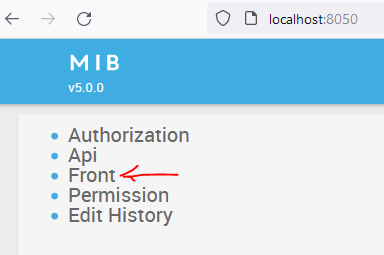
Credentials:
administrator
mediaibox
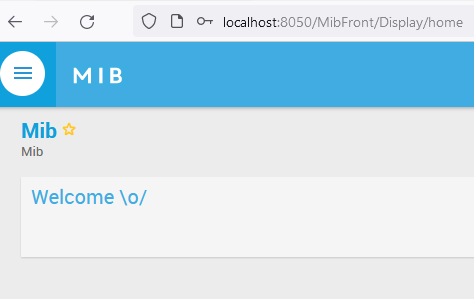
If everything went well, the Mib homepage will be displayed
Next steps
- Build something end-to-end: Hands-On — Build a MIB Extension — two custom mediatypes, a C# backend component, and a React widget, wired through Docker, ADM metadata, and Module Federation.
- Hit a wall bringing the stack up? Running a Local MIB Stack — Gotchas & Fixes.