MibAuthorizationServerConfig
Introduction
This configuration is intended for Authorization service.
Default Section
The main configuration options for the authorization server.
Keys
UseNewLoginUi
Type: boolean
Description: Enables the new Login UI. Set to false to use the old UI.
Default value: false
FrontendAppRootUrl
Type: string
Description: Specifies the URL where the SPA (Single Page Application) for the Auth UI is served.
Default value: empty
Note: The Auth UI app is served by default under the base path
/auth. Set this value accordingly.
SecurePassword
Type: boolean
Description: Enables secure password requirements.
Default value: false
PasswordExpiration
Type: integer
Description: Number of days before a password expires.
Default value: 7
AuthCodeExpiration
Type: integer
Description: Expiration time (in minutes) for authentication codes.
Default value: 60
RootUrl
Type: string
Description: Base URL for the authorization server.
Default value: empty
DefaultLanguage
Type: string
Description: Default language for the UI.
Default value: en-us
CookieName
Type: string
Description: Name of the authentication cookie.
Default value: empty
CookieExpireTimeSpan
Type: string
Description: Expiration timespan for the authentication cookie.
Default value: TimeSpan.MinValue
CookieSlidingExpiration
Type: boolean
Description: Enables sliding expiration for the authentication cookie.
Default value: false
Language
Type: string
Description: Language for the UI.
Default value: empty
TokenEndpoint
Type: string
Description: Path for the token endpoint.
Default value: empty
AuthorizeEndpoint
Type: string
Description: Path for the authorize endpoint.
Default value: empty
LoginEndpoint
Type: string
Description: Path for the login endpoint.
Default value: empty
LogoutEndpoint
Type: string
Description: Path for the logout endpoint.
Default value: empty
AllowInsecureHttp
Type: boolean
Description: Allows HTTP (not recommended for production).
Default value: false
AuthorizationCodeSeconds
Type: integer
Description: Expiration time (in seconds) for authorization codes.
Default value: 0
Deprecated (MEDIAIBOX-11999 / OpenIddict): no longer read. The authorization-code lifetime is now configured via
AuthorizationCodeLifetime(seconds) in MibIdentityConfig.
AccessTokenMinutes
Type: integer
Description: Expiration time (in minutes) for access tokens.
Default value: 0
Deprecated (MEDIAIBOX-11999 / OpenIddict): no longer read. The access-token lifetime is now configured via
AccessTokenLifetime(seconds) in MibIdentityConfig.
RefreshTokenHours
Type: integer
Description: Expiration time (in hours) for refresh tokens.
Default value: 0
Deprecated (MEDIAIBOX-11999 / OpenIddict): no longer read. The refresh-token lifetime is now configured via
AbsoluteRefreshTokenLifetime/SlidingRefreshTokenLifetime(seconds) in MibIdentityConfig.
ClientId
Type: string
Description: OAuth client ID.
Default value: empty
ClientSecret
Type: string
Description: OAuth client secret.
Default value: empty
WorkflowAssembly
Type: string
Description: Workflow assembly name.
Default value: empty
WorkflowFactory
Type: string
Description: Workflow factory class.
Default value: empty
ProfileImages
Type: string
Description: Path for profile images.
Default value: profileimages
TemProfileImages
Type: string
Description: Path for temporary profile images.
Default value: temprofileimages
EmailFromToMessages
Type: string
Description: Path for email templates.
Default value: temprofileimages
DefaultSkin
Type: string
Description: Default UI skin.
Default value: empty
ProfileImageExtensions
Type: string
Description: Allowed extensions for profile images.
Default value: jpg;jpeg;png
CustomCaptchaFontsFolder
Type: string
Description: Path for custom captcha fonts.
Default value: empty
ContactUsUri
Type: string
Description: URI for the contact us page.
Default value: #
CorsHeaders
Type: string
Description: Allowed CORS headers.
Default value: *
CorsMethods
Type: string
Description: Allowed CORS methods.
Default value: *
CorsOrigins
Type: string
Description: Allowed CORS origins.
Default value: RootUrl configured
CorsAllowCredentials
Type: boolean
Description: Allows credentials in CORS requests. (Enabling this configuration in Production environment is discouraged)
Default value: false
KnownProxies
Type: string
Description: Comma-separated list of trusted proxy IP addresses whose X-Forwarded-For header the server will honor. When the Authorization Server is deployed behind a reverse proxy or load balancer (NGINX, IIS ARR, AWS ALB, etc.), the IP captured at the application layer is the proxy's IP, not the end user's. Populate this key with each proxy IP to allow the ForwardedHeadersMiddleware to rewrite RemoteIpAddress with the real client IP from X-Forwarded-For. Example: 10.0.0.5,10.0.0.6.
Default value: empty
Note
The IPv4 loopback range 127.0.0.0/8 and the IPv6 loopback ::1 are always trusted by default. You do not need to add them here.
If neither KnownProxies nor KnownProxyNetworks is populated and the server is behind a proxy, the recorded client IP (e.g. in the ADM_USER_LOGIN_HISTORY audit table) will be the proxy's IP. Conversely, never set this to 0.0.0.0/0 or similar wildcards — an untrusted source could spoof X-Forwarded-For and pollute audit data.
KnownProxyNetworks
Type: string
Description: Comma-separated list of trusted proxy networks in CIDR notation. Use this instead of (or in addition to) KnownProxies when proxies are deployed in a subnet with rotating IPs (auto-scaling groups, Kubernetes pods, multi-AZ load balancers). Each entry follows the <address>/<prefix> form. Example: 10.0.0.0/24,172.16.0.0/12.
Default value: empty
Note
CIDR refresher:
• 10.0.0.5/32 — a single host (equivalent to listing it in KnownProxies).
• 10.0.0.0/24 — 256 hosts (10.0.0.0 to 10.0.0.255).
• 10.0.0.0/16 — 65,536 hosts.
• 10.0.0.0/8 — the entire RFC 1918 class A private range.
Prefer the narrowest range that still covers your proxy fleet.
AllowUseOfMeInAnonymousMode
Type: boolean
Description: Allows use of the /me endpoint in anonymous mode.
Default value: false
ShowFullDebugPage
Type: boolean
Description: Enables full debug page.
Default value: false
StorageTypeForUserProfileImage
Type: string
Description: Storage type for user profile images.
Default value: disk
Theme Section
The configurations for the login UI.
Keys
Logo
Type: string
Description: URI for the logo image. Can be a relative or absolute URI.
Default value: /ux/img/logo/agile-full-logo.png
ColorPrimary
Type: string
Description: Primary color for the theme (hex code).
Default value: #15C993
ColorSecondary
Type: string
Description: Secondary color for the theme (hex code).
Default value: #17316C
Examples
MIBAUTHORIZATIONSERVERCONFIG_THEME_LOGO=https://cdn.com/logo.png
MIBAUTHORIZATIONSERVERCONFIG_THEME_COLORPRIMARY=#15C993
MIBAUTHORIZATIONSERVERCONFIG_THEME_COLORSECONDARY=#17316C
DataProtection Section
Configuration for data protection and key management.
Keys
Type
Type: string
Description: Data protection type.
Default value: empty
Directory
Type: string
Description: Directory for data protection keys.
Default value: empty
DisableAutomaticKeyGeneration
Type: boolean
Description: Disables automatic key generation.
Default value: false
KeyLifetime
Type: integer
Description: Lifetime of data protection keys.
Default value: 0
AuthenticationSecurityRules Section
Rules for user authentication and account security.
Keys
BlockUserWhoDoesNotChangePasswordWithinACertainPeriodOfDays
Type: integer
Description: Number of days before a user who does not change their password is blocked.
Default value: 0
BlockInactiveUserAccountsInADefinedPeriodOfDays
Type: integer
Description: Number of days before inactive user accounts are blocked.
Default value: 0
LockServer Section
Configuration for lock server integration.
Keys
Enabled
Type: boolean
Description: Indicates whether the service is enabled for MIB users.
Default value: false
Type
Type: enum
Description: Defines the service type that will be used.
Available options: Latch
LocalTotp: Used for local 2FA with totp codes.
Default value: empty
Url
Type: string
Description: Base URL for accessing the chosen integration service.
Default value: empty
ApplicationId
Type: string
Description: Application ID configured in the integration service.
Default value: empty
ApplicationSecret
Type: string
Description: Application secret code configured in the integration service.
Default value: empty
ProxyEnabled
Type: boolean
Description: Indicates whether the requests made by the service should use a proxy.
Default value: false
ProxyUrl
Type: string
Description: Proxy URL.
Default value: empty
ProxyUserName
Type: string
Description: Proxy user name.
Default value: empty
ProxyPassword
Type: string
Description: Proxy password.
Default value: empty
ServiceWebSite
Type: string
Description: URL for the service website.
Default value: empty
ServiceUrlLogotipo
Type: string
Description: URL for the service logo. If the 'Type' is 'Latch', there is already a logo in the assets. However, it is possible to change the logo via URL if preferred.
Default value: empty
Default: ux/img/logo/latch.jpg
serviceLogotipoStyle
Type: string
Description: CSS style for custom logotipo. If the 'Type' is 'Latch', there is already a CSS style for the logo. However, it is possible to change the style if preferred.
Default value: empty
Default: width: 90px; height: 38px; cursor: pointer;
Operations
Type: string[]
Description: List of operations, identifier, and status configured in the integration service application. This information will be used to reference internal operations in the MIB and must follow this writing pattern: OperationName:OperationId:OperationStatus(true or false).
To configure multiple sets of operations, use the ; separator. Example: OperationName1:OperationId1:OperationStatus1;OperationName2:OperationId2:OperationStatus2.
Default value: empty
Note
Understanding the configuration pattern Operations: OperationName1:OperationId1:OperationStatus1
OperationName1 -> Name of the operation, used for identification.
OperationId1 -> Id related to the operation, retrieved by the server. Each application may contain a different Id.
OperationStatus1 -> true or false, enables or disables the operation. Validation will also be performed with the integration.
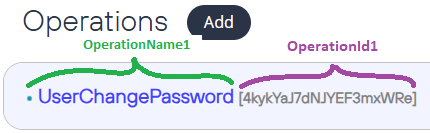
MIBAUTHORIZATIONSERVERCONFIG_LOCKSERVER_OPERATIONS=UserChangePassword:4kykYaJ7dNJYEF3mxWRe:true
Who uses this configuration?
- MibAuthorizationServer
Examples
MIBAUTHORIZATIONSERVERCONFIG_DEFAULT_SECUREPASSWORD=false
MIBAUTHORIZATIONSERVERCONFIG_DEFAULT_ROOTURL=https://auth.com
MIBAUTHORIZATIONSERVERCONFIG_DEFAULT_LANGUAGE=pt-br
MIBAUTHORIZATIONSERVERCONFIG_DEFAULT_KNOWNPROXIES=10.0.0.5,10.0.0.6
MIBAUTHORIZATIONSERVERCONFIG_DEFAULT_KNOWNPROXYNETWORKS=10.0.0.0/24,172.16.0.0/12
MIBAUTHORIZATIONSERVERCONFIG_DATAPROTECTION_KEYLIFETIME=0
MIBAUTHORIZATIONSERVERCONFIG_AUTHENTICATIONSECURITYRULES_BLOCKUSERWHODOESNOTCHANGEPASSWORDWITHINACERTAINPERIODOFDAYS=0
MIBAUTHORIZATIONSERVERCONFIG_LOCKSERVER_ENABLED=true
MIBAUTHORIZATIONSERVERCONFIG_LOCKSERVER_URL=https://mylockserver.com
Reverse proxy deployment
When the Authorization Server runs behind a reverse proxy or load balancer (NGINX, IIS ARR, AWS ALB/ELB, Kubernetes Ingress, etc.), the TCP connection seen by Kestrel originates from the proxy — not the end user. Without configuration, the real client IP is lost, which directly impacts:
- The
IP_ADDRESScolumn ofADM_USER_LOGIN_HISTORY(introduced in MEDIAIBOX-11773), used by the Security team to detect brute-force and credential-stuffing attacks. - Any feature that depends on
HttpContext.Connection.RemoteIpAddress.
To restore the real client IP, populate KnownProxies and/or KnownProxyNetworks with the proxy fleet. The server uses the standard ASP.NET Core ForwardedHeadersMiddleware, configured to trust only the IPs/networks declared. If a request arrives from an undeclared source, its X-Forwarded-For is ignored — protecting the audit trail from spoofing.
Topology examples:
# Single VM, NGINX in front (same host)
MIBAUTHORIZATIONSERVERCONFIG_DEFAULT_KNOWNPROXIES=127.0.0.1,::1

# AWS ECS behind ALB in a /16 VPC
MIBAUTHORIZATIONSERVERCONFIG_DEFAULT_KNOWNPROXYNETWORKS=10.0.0.0/16

# On-prem with three fixed proxy IPs
MIBAUTHORIZATIONSERVERCONFIG_DEFAULT_KNOWNPROXIES=172.20.1.10,172.20.1.11,172.20.1.12

# Multi-layer (CloudFront → ALB → NGINX → Kestrel), trust all private ranges
MIBAUTHORIZATIONSERVERCONFIG_DEFAULT_KNOWNPROXYNETWORKS=10.0.0.0/8,172.16.0.0/12,192.168.0.0/16
The default ForwardLimit is set to 3 hops, which covers the common multi-layer topology above. Contact platform engineering if a deployment legitimately requires more.