Menus
The left-side navigation menu in the React shell is data-driven —
its content is stored in the MIB3UX_MENU table of the FrontEnd DB,
and the shell renders it from a single /api/menu BFF call at login.

Related docs.
Pages & Templates — the pages this menu links to.
Permission Microservice — how menu items are filtered per user.
Theming & CSS — theming the menu chrome.
What ships out of the box
The shell renders a predefined set of "always present" items that do
not need to be configured in MIB3UX_MENU:
| Item | Route | Behaviour |
|---|---|---|
| Start | The page named by MibCmsFrontEndServerBaseConfig.StartPage |
Lands on the configured start page. |
| History | ~/app/page-history |
Recently visited pages. |
| Favorites | ~/app/favorites |
The user's pinned pages. |
Plus the fixed user-account route exposed via the top-right avatar:
| Item | Route | Behaviour |
|---|---|---|
| Account | ~/app/account |
The user profile page. Generated by the BFF and exposed to the shell. |
For the Account link to function, the React-shell path must be
configured correctly:
MibCmsFrontEndServerBaseConfig.FrontEndAppPath.
Everything else in the left navigation is operator-defined via
MIB3UX_MENU.
How the menu is rendered
- The BFF queries
MIB3UX_MENUand returns rows the current user can access (filtered against the user'sMediaTypePermissions/SourcePermissionsvia the Permission MS). - The shell builds a tree using each row's
PARENT_MENU_IDandORDER. - Each row's
URLdecides the action:~/app/<pageKey>→ navigate to a React-shell page (in-SPA).- Any other URL → external link (opens in the same tab unless marked otherwise by the URL itself).
The menu is fetched once per login and cached in the shell until
logout. Server-side it is cached by MibObjectCacheConfig.MIB3UX_MENU
(default 24h TTL) — admins editing the menu may need to wait the TTL
or restart the BFF for changes to propagate.
Standards for admin / dashboard pages
Some operator-facing pages have conventional URL slugs the shell expects so it can apply the right icons and link from related views. The conventions are:
| Page | Expected URL slug | Example |
|---|---|---|
| Users | user-list-page |
~/app/user-list-page |
| Groups | group-list-page |
~/app/group-list-page |
| Instances | instance-list-page |
~/app/instance-list-page |
| Page History | page-history |
~/app/page-history |
| User History | user-history |
~/app/user-history |
These slugs are how the shell decides "the users page" for purposes of in-app navigation — e.g. linking from an audit entry's user pill to the user's edit page. Use the conventions if you want the built-in deep-link affordances to work; pick your own slug if you don't need them.
MIB3UX_MENU columns
Every custom menu item is one row in this table.
MENU_KEY
Required. The unique string identifier of the row. Used as the React key when rendering — change it only when you also intend to drop and re-add the entry.
URL
Required for leaf rows. Where this item navigates.
| Renderer | URL prefix | Example |
|---|---|---|
| React shell | ~/app/<pageKey> |
~/app/articles_list |
| External link | full URL | https://wiki.example.com/cms |
For group rows (rows that exist only as containers for child
items), set URL to NULL. The shell renders these as a collapsible
header with the child items underneath.
The ~/ prefix is resolved to the FrontEnd Server's root URL at
render time, so the same row works across environments.
PARENT_MENU_ID
The id of this item's parent in the tree. NULL (or absent) means
this row is at the root of the menu (a top-level item).
There is no hard limit on hierarchy depth, but the React shell renders the menu cleanly only up to three levels (root → group → sub-group → page). Deeper than that and the visual nesting gets awkward.
ORDER
Numeric. Defines the position of items under the same parent. Items
with the same ORDER resolve to insertion order (database row
order) — prefer unique ORDER values per group to keep rendering
deterministic across environments.
ICON_URL
A name from the shell's icon registry, or a URL to an SVG. The React
shell maps short names (articles, users, commerce, live, …)
to its bundled icon set; arbitrary URLs work too but the icon
library names are preferred for visual consistency.
Confirm the naming convention with the UI/UX team before adding a new icon — the shell's icon registry is enumerated, not freeform.
Permissions and the menu
Menu visibility is filtered against permissions on the mediatype the page operates on. Concretely:
- The BFF reads each row's
PAGE_KEY(fromURL) and looks up the page'sMEDIA_TYPE_NAMEfromMIB3UX_PAGES. - It asks the Permission MS: "does the current user have at least
CanReadon this mediatype?" - If not, the row is filtered out before the shell sees it.
Adding a menu row is also a permission-configuration step: an admin user who is supposed to see the menu must have the matching mediatype permission configured in the Authorization Server's admin UI. Otherwise the row is silently filtered out — the operator sees nothing where the menu entry should be.
See Permission Microservice for how permissions propagate.
Account page
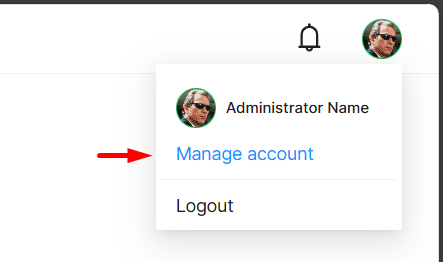
The Account page is a mandatory application route that the BFF generates automatically and exposes to the React shell. The user avatar in the top-right opens a dropdown with the user's name, a "Manage account" link to the Account page, and a "Logout" action:

It is not stored in MIB3UX_MENU — it's a hard-coded entry in
the shell. For the link to function properly, ensure the
front-end app path
is correctly configured in the FrontEnd Server.
Worked example
A typical customer menu has three top-level groups, each containing a few pages:
Content
  ├─ Articles                   ~/app/articles_list
  ├─ Authors                    ~/app/authors_list
  └─ Categories                 ~/app/categories_list
Operations
  ├─ Page History               ~/app/page-history
  └─ User History               ~/app/user-history
Admin
  ├─ Users                      ~/app/user-list-page
  ├─ Groups                     ~/app/group-list-page
  └─ Instances                  ~/app/instance-list-page
The corresponding rows, expressed as SQL inserts (production should ship these as a migration, not as ad-hoc INSERTs):
-- Three top-level group rows (no URL, no parent)
INSERT INTO MIB3UX_MENU (MENU_KEY, URL,  PARENT_MENU_ID, "ORDER", ICON_URL)
VALUES                  ('content',    NULL, NULL,           10,    'folder');
INSERT INTO MIB3UX_MENU (MENU_KEY,    URL,  PARENT_MENU_ID, "ORDER", ICON_URL)
VALUES                  ('operations',NULL, NULL,           20,    'wrench');
INSERT INTO MIB3UX_MENU (MENU_KEY, URL,  PARENT_MENU_ID, "ORDER", ICON_URL)
VALUES                  ('admin',     NULL, NULL,           30,    'shield');

-- Articles under Content
INSERT INTO MIB3UX_MENU (MENU_KEY,   URL,                   PARENT_MENU_ID,
                          "ORDER",    ICON_URL)
VALUES                   ('articles', '~/app/articles_list',
                          (SELECT ID FROM MIB3UX_MENU WHERE MENU_KEY = 'content'),
                          10,         'articles');
-- ... and so on for the other pages
In a customer customisation repo this is more typically expressed
through a seed helper:
seed.AddOrUpdateMenu(new UxMenu
{
    MenuKey  = "articles",
    Url      = "~/app/articles_list",
    ParentMenuKey = "content",
    Order    = 10,
    IconUrl  = "articles",
});
Check the customer customisation's src/Database/Migrations/ for
the seed helper signature and concrete examples.
Verifying
Three ways to inspect a configured menu:
A. Network panel
Open the shell, open DevTools → Network, find GET /api/menu. The
JSON response is the filtered, ordered tree the user sees. Missing
entries here that exist in MIB3UX_MENU are filtered by the
permission step — see Permission Microservice.
B. Direct SQL
SELECT MENU_KEY, URL, PARENT_MENU_ID, "ORDER"
FROM   MIB3UX_MENU
ORDER  BY PARENT_MENU_ID NULLS FIRST, "ORDER";
C. Local Development tool
The dev tool's menu editor opens the same rows in a structured UI — see Local Development.
Common gotchas
- Missing icon. A row with no
ICON_URLrenders as a plain bullet in the menu. Always set it. - Stale menu after edit. The shell caches the menu for the
duration of the session, and the BFF caches it for 24h by default.
After editing
MIB3UX_MENU, expect the change to be invisible to in-session operators until they log out and back in (and possibly until the BFF cache TTL elapses). - Permission misconfigured. A new row that doesn't appear for the operator is almost always a missing mediatype permission — not a menu-config bug.
- Tree too deep. Limit to three levels for readable navigation.
See also
- Pages & Templates — pages linked by the menu
- Permission Microservice — how menu items are filtered per user
- Theming & CSS — theming the menu chrome
MibCmsFrontEndServerBaseConfig.FrontEndAppPath— required for the Account link to work- Local Development — UI for editing menu rows