Administration in the CMS — users, groups, instances and your account
From MIB 7.0, a MIB install is administered inside the React CMS. Users, groups, instances and permission grants have their own CMS pages, and every user manages their own profile, password and two-factor authentication on the Account page. The Authorization Server still owns the data — users, groups, instances and grants live in its database and it serves them over its JSON admin API — but it is no longer where anyone clicks.
Warning
Do not use the Authorization Server's own pages. /Admin/Users, /Admin/Groups, /Admin/Instances
and /Account on the Authorization Server are the legacy server-rendered (Razor) UI. They are deprecated
in MIB 7.0 and must not be used: /Admin/* sends every user, administrators included, to
/Account/AccessDenied
(MEDIAIBOX-12394). Sign in through the
React Auth UI (Migrating to the New Login UI)
and use the pages below.
The pages
| Page | Route in the shell | What it is for | Who can use it |
|---|---|---|---|
| Users | ~/app/user-list-page, then user-edit-page/<id> |
List, create, edit, enable/disable and delete users; set a user's groups, instance and grants | Administrators and sub-administrators |
| Groups | ~/app/group-list-page, then group-edit-page/<id> |
Create and edit groups, their permission grants and their members | Administrators edit; sub-administrators manage members |
| Instances | ~/app/instance-list-page, then instance-edit-page/<id> |
Create, edit and delete instances (the user/group partition — see Instances) | Administrators |
| Account | ~/app/account (avatar → Manage account) |
The signed-in user's own profile, password, two-factor authentication and authorized applications | Every user |
The BFF builds these pages in code (MibServer3 AuthorizationController on
/api/v2/display/<page-key>, and Workflow.Mvc/Authorization/Pages/*), so they need no MIB3UX_PAGES or
template rows. Users, Groups and Instances are reached through ordinary menu entries
(MIB3UX_MENU, IS_REACT = 1) whose URL is the page route — see the Admin group in
Menus — worked example. The Account page is a fixed route of the shell
(Menus — Account page).

Who can do what
What a user may do on these pages comes from their user type, which the Authorization Server reports
with the user's profile — not from roles in the login cookie, so these pages are not affected by the
/Admin/* AccessDenied issue.
| User type | How a user gets it |
|---|---|
| Administrator | The built-in administrator, or membership of the Administrators group (ADM_GROUPS ID 1). |
| Sub-administrator | Is Administrator switched on in the user's page by an administrator (stored as ADM_USERS.IS_AUTH_ADMIN). Only offered to a user outside the Administrators group. |
| User | Everyone else. |
| Action | Administrator | Sub-administrator |
|---|---|---|
| Create, edit, delete instances | ✓ | — |
| Edit a group's information and grants | ✓ (the Administrators group itself is read-only) | — |
| Add or remove a group's members, a user's groups | ✓ | ✓ (not on their own user) |
| Enable or disable a user | ✓ | only users of type User |
| Switch Is Administrator on a user | ✓ (not on a non-interactive user) | — |
| Delete a user | ✓ (never the built-in administrator, ID 1) | ✓ (same) |
On the Users list, a viewer who is not an administrator does not see administrator users, except their own record (MEDIAIBOX-12234).
Editing a user
The user page groups its sections in a side index: User information (full name, username, Enable User, Is Administrator, Non-Interactive, company, e-mail, time zone, profile picture, notes, and the instance under Category), Change password (new password, Password expires?, Change password at next login), Groups, and one permission table per API client and object type — MIB API: Media Types Permissions, MIB API: Sources Permissions, and the Boolean (menu and feature) permissions each client publishes.

The permission tables are rendered by the permissionList core component: one row per media type, source
or Boolean key, with Read, Write, Delete, their (Owner) variants and Audit. A group page carries
the same tables for the group, plus its Users list.
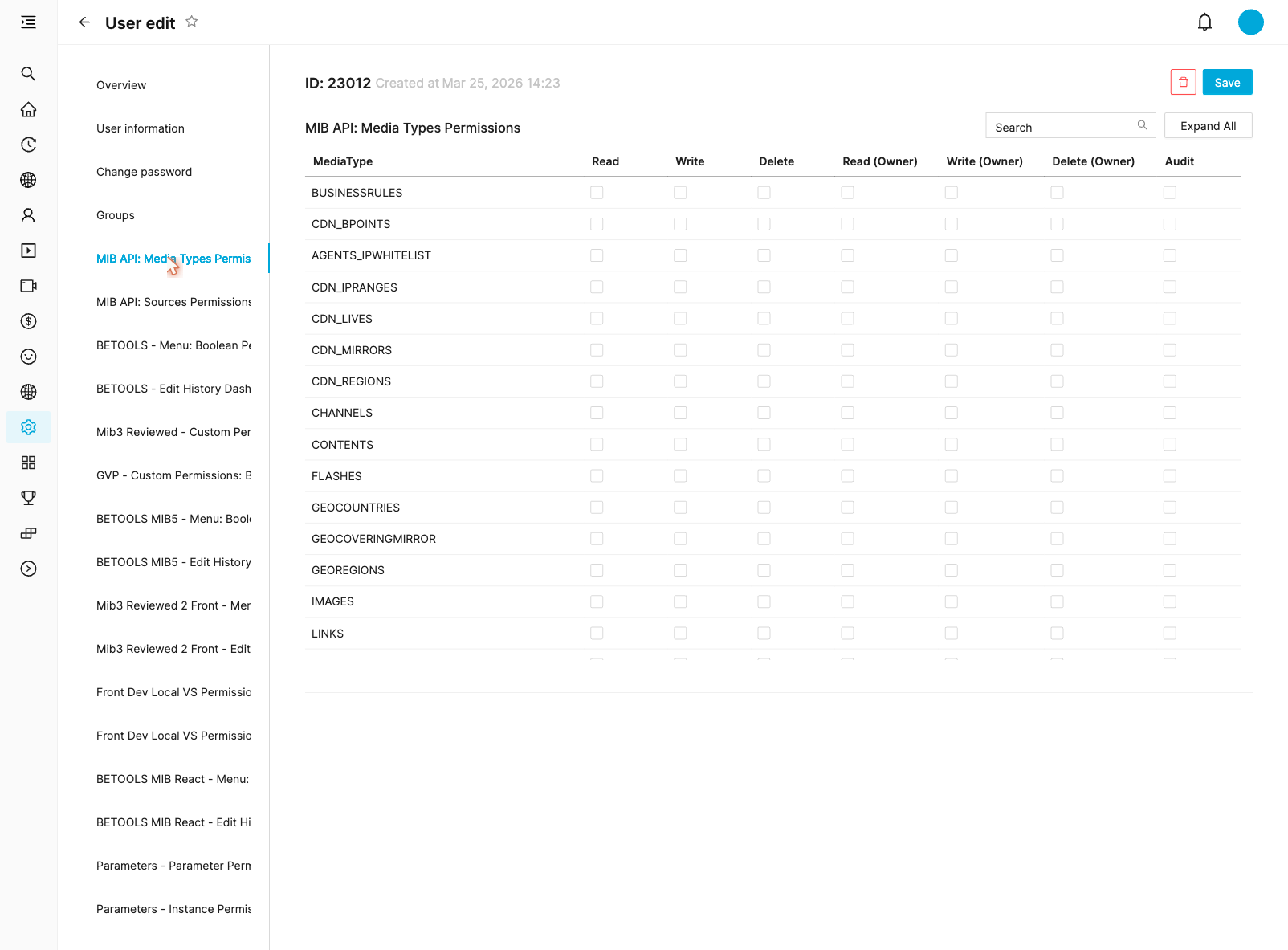
The grants are rows of AUTH_PERMISSIONS; which keys exist per API client, and how a consumer checks one,
is in Configurable permissions. The user page has no two-factor
control: two-factor authentication is set up by each user on their own Account page.
Your account
Every user opens Manage account from the avatar menu. The page has:
- User information — name, e-mail, company, profile picture, and the time zone and language the CMS uses for this user (see Localization and User preferences).
- Lock Service — only when the Authorization Server's lock server is enabled: two-factor authentication with any authenticator app (see Two-factor authentication). A Latch field appears only when the lock server runs the deprecated Latch provider (MEDIAIBOX-12336).
- Change password — current password, new password, confirmation.
- Authorized applications — the OAuth clients this user has authorized, each of which can be revoked.
Automation and tests
- Seed users, groups and grants for a new install with migrations — see Permission data model and User data model.
- For a login-capable test user with per-source grants on a local stack, use
mib client user create— see Creating a login-capable non-admin test user.
Under the hood
| CMS page | BFF endpoints | Authorization Server |
|---|---|---|
| Users, Groups, Instances | GET/POST/PUT/DELETE /api/v2/display/{user,group,instance}-{list,edit}-page… (AuthorizationController) |
JSON admin API under /api/v2/admin/* |
| Account | GET/PUT /api/v2/display/account-page/{userId}, DELETE …/account-page/application-list/{applicationId} |
/api/v2/account, /api/v2/account/applications |
| Two-factor pairing | /api/v2/account/lock-server/2fa/{userId} (+ /qrcode), /api/v2/account/lockserver/totp/{userId}/pair, …/validate (BFF AccountController) |
/api/v2/account/lockserver/config, /api/v2/account/lockserver/totp/{userId}/{qrcode,pair,unpair,validate} |