Menu Configuration
Media‑iBox Server 3 provides a predefined application menu that includes the following items:
- Start – Redirects the user to the start page.
- History – Displays a list of recently accessed pages.
- Favorites – Displays the user’s favorite pages.
In addition to these items, there are fixed application routes:
- Account – Opens the user profile page (see).
MIB3UX_MENU Keys
Each custom menu item needs to have its own configuration in this table.
MENU_KEY
A key for a menu item. It must have an unique value.
URL
URL of the page which should be opened when clicking on this item. For rendering purposes, when a page needs to be rendered in React it must be specified through this configuration using "app" instead of "Display", i.e.:
| Renderization | Description |
|---|---|
| React | ~/app/images_list |
| Legacy (old or external pages) | ~/Display/images_list |
PARENT_MENU_ID
ID of the parent menu item of a this item, making possible to create a tree structure with custom items in the menu. When there is no value in this field, this item will be a root menu item.
ORDER
Defines the order in which the items under a same parent should appear.
ICON_CSS
CSS for the menu icon.
ICON_URL
URL for the menu icon.
IS_REACT
If true, it indicates that the menu item should be visible only in React. If false, the menu item should be visible only in Legacy.
Menu Configuration (React Front-end)
With the migration to the new React front-end, the fixed menus Administration and History Dashboard have been removed from the MibServer3 code.
These menus can now be configured directly in the MIB3UX_MENU table, allowing permission control through MibAuthorization.
Standards for Administration Pages
For Administration pages to be correctly identified and displayed, the access URL must contain the following names:
| Page | Expected Name in URL | Example URL |
|---|---|---|
| Users | user-list-page |
~/app/user-list-page |
| Groups | group-list-page |
~/app/group-list-page |
| Instances | instance-list-page |
~/app/instance-list-page |
Standards for History Dashboard Pages
History Dashboard pages must also follow specific naming patterns:
| Page | Expected Name in URL | Example URL |
|---|---|---|
| Page History | page-history |
~/app/page-history |
| User History | user-history |
~/app/user-history |
Icon Configuration
- The
MIB3UX_MENU.ICON_URLfield must be filled in according to the naming conventions provided by the front-end team. - Always check with the UI/UX team to ensure visual consistency.
Account page
The User Account page is a mandatory application route that MibServer3 generates automatically and exposes to the front-end application.
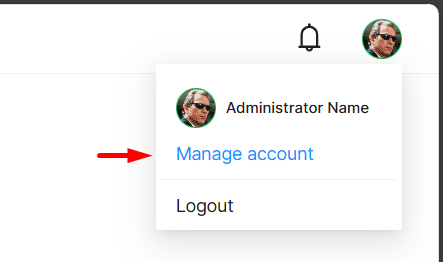
For this link to function properly, ensure that the front-end application path is correctly configured in your MibServer3 setup.
Refer to the configuration guide for details: See.